
IOP Wiki:How To/GFL2/T-Doll

The main page for Tactical Dolls from Girls' Frontline 2: Exilium uses Template:GFL2Doll. Consult the template to see parameters details.
Core Page Examples
- New Doll: Sharkry
- Doll that appeared in previous games: Daiyan (GFL2)
About titles
To distinguish the article of Dolls with the same name in another game, “(GFL2)” is specified in the title. The solution to generalize game prefix for all pages was previously discussed and rejected as it made navigation less intuitive.
Leaving a warning banner at the top of the article
If there are a few spoilers in text form, apply Template:spoiler to the text in question. If the page you're creating contains a lot of text spoilers or spoiler images, you should add Template:Spoiler at the top of the page and don't bother censoring everything.
If you're creating the base of the article so it is referenced but doesn't include all the info in one go, add Template:Stub at the very start. If you intend to return to the article shortly, use Template:WIP.
If the article is already well-developed but you know it's still missing some things, use Template:Incomplete and define a reason parameter as a guide for the next editor.
Main article
Infobox
- Portrait: See #Files
- Full Name: Used to exclude the “(GFL2)” part of the title from other templates.
- Role, Specialty, Rarity, Affiliation, Body Type, Signature Weapon, Weapon Type, Affinities, Weaknesses, Personality, Imprint Boost: Taken from social media introduction or in-game
- Released on: Should use Template:doll_server_alias to list the name of the Doll on a server where it differs from the others. Should also contain release year and month.
- Voice Actors: Found on social media introduction or in-game (in the Character Archive), should be displayed with Template:voice actor name.
- Artist: For the main artwork. Artists are not credited in-game but may announce their participation to the game on their personal social media. Should be displayed Template:artist name and always have a reference.
- Covenant: Lists servers where Covenant is available.
Summary
Usually left by default, the summary parameter can be defined to provide disambiguation links to topics with similar or identical names, like for Helen.
Corresponding characters
For Dolls that appear in other games (identity confirmed or otherwise), use the PNC (for Project Neural Cloud), GFFC (for Fire Control) or GFL (for Girls' Frontline) parameters with the title of the corresponding article to display a quick link.
How to obtain
Taken from in-game observation or introduction post on social media.
Skills
- Core examples
Skills rely on information declared in a table using Template:SkillPanel. The table must be set in subpages of the T-Doll's articles (examples: Sharkry/skilldata, Sharkry/skill5data). This is also where the skill icon will be defined.
To reproduce the colors used in the skill descriptions, use Template:Color.
Remolding Core
- Core example
The types of the last three Growth Data slots, the Imago Factor costs, the first Imagoform and the sixth Imagoform are the only information that needs to be provided by hand.
The first three Growth Data slots always correspond to the Dolls' type, but the last three change with the Doll. The four intermediate Imagoforms are common to all Dolls depending on their type and skill phase. The first Imagoform is unique to each Doll. The Imago Factor costs and sixth Imagoforms may be reused between Dolls, but with no reliable pattern.
Neural Helix
Can be transcribed from social media posts or in-game.
Preferred gifts
Contains the list of gifts that have a pink, green or yellow icon when gifted to the Doll. Pink icons go into the Loves category, green icons in Favors, and yellow in Likes. The rarity of the gifts can be indicated by applying Template:Color to the name of the gift.
Strategies
Free-form text about gameplay strategies. Should include generalities about the Doll's role, other Dolls with synergies, the strengths and weaknesses of each skill and recommended levels of fortifications.
If there is a lot to say, create a #Strategy subpage.
Character Design
Free-form text. Can contain a description of the T-Dolls' appearance and point out key design traits. Can also contain remarks from the artist, if a reference can be provided.
Character Background
Must contain the official social media introduction.
Weapon Background
If the Doll existed in GFL1, should contain a link to the section of the same name in her GFL1 page. If not, this is free-form text about the weapon's history and details. References are appreciated.
Lore
Free-form text, but only used when a #Story subpage would be too short. References are appreciated.
Outfits
Should contain the names and method of acquisition of this Doll's costumes, as well as notable information about them.
Gallery
The gallery parameter should contain only the full-body illustrations. Costume names should be indicated but any other costume information must be added to GFL2 Costumes. Any other file should be listed in the galleryAlt parameter.
Trivia
Should be presented as a bullet point list. Can include trivia about the real-world weapon that are not part of the core Weapon Background section.
Subpages
These are the pages accessed with the tab at the top of the main page.
Strategy
Free-form description of the strengths and use of the T-Doll in the gameplay.
Profile
Contains either a recap or transcript (using Template:Dialogue) of the Doll's Private Meeting Logs, and Tea Time dialogues if they exist, from the Crew Deck.
For Dolls compatible with Covenant, the page should also contain the transcripts of the eight Journals entries, and either recap or transcripts of the five Memories scenes.
Story
Should only exist if there is enough material to cover (several substantial paragraphs). If not, use #Lore.
If the Doll already existed in the first game, should contain a redirect to the GFL1 story page.
The page should be organized in the same way as explained in IOP Wiki:How To/GFL/T-Doll#Story.
Quotes
Uses Template:GFL2QuotesSub. The list of entries is flexible because the number of voices varies between Dolls.
Contains a transcript of the voice lines and sound files. The main Quotes subpage only displays JP files. For CN and KR files, a second subpage should be created.
Files
Naming conventions
Some files must respect naming conventions when uploaded because they will be displayed automatically based on their name.
Any character illustration besides the default appearance is designated "costume" and numbered (usually in the order of addition to the game). A T-Doll with four costumes would have one basic set of files bearing her name, then four sets of files bearing her name with the tag “costume1” through “costume4”.
Where to find files
Aside from promo images and misc illustrations, all files must be extracted directly from the game or from the character list on the official CN website. Do not reuse files found on unofficial sources. This is to ensure they are unmodified and up to date.
Use any of the methods and tools documented by the community to extract the files from the archive files named after the T-Doll. Or ask in our Discord.
Note: The name of the Dolls in game files is not always the same as in-game. The technical name should be added to #Trivia for reference.
Regarding Live2D story portraits
External Live2D tools can be used on extracted game files to reconstruct animated story portraits and expressions. These tools enable to take pictures of story portraits with wider shots than shown in-game, and to capture every expression stored in game files.
However, pictures taken with these tools cannot be considered official because they may not accurately reproduce in-game results due to implementation differences, and give access to expressions not actually used in-game. The artwork parts normally out-of-frame don't necessarily contain any actual hidden detail, or may be of lower quality as they're not meant to be shown.
For these reasons, only one image of the reconstituted story portrait should be displayed in the "Other artworks" section of a page (the exact content of this image is left to the user's discretion). The caption must indicate its nature as a reconstituted image alongside a link to the program used. See Cheeta#Other artworks for an example.
Portraits
- Naming Convention
<Articlename>_S.png
Portraits are stored in the game with the title Avatar_Bust_<Dollname>.
-
 Portrait example: Groza_S.png.
 -
 Portrait example: Vector_(GFL2)_S.png

_S.png)
Full-body illustrations
- Naming Convention
<Dollname>_Whole.png<Dollname>_3D.png<Dollname>_costume<Number>.png
The “whole” main artwork and costumes can be found on the official website or in the game files with the name Avatar_Whole_<Dollname>. In-game file may sometimes be cropped, in which case the website version is preferred. The in-game and website artworks may be different, in which case the website version should be stored in the Alternate gallery.
The “3D” in-game preview should be taken from the official website.
-
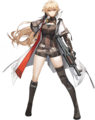 Example: Groza_Whole.png.
 -
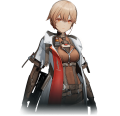 Example: Groza_3D.png.
 -
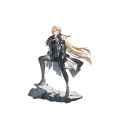 Example: Groza_costume1.png.


Skill icons
- Naming Convention
Icon_Skill_<Original filename>.png
These are defined in the skills subpages. The original file name should be kept because certain skill icons are reused for other Dolls (especially for base attacks).
-
 Example of skill icon: File:Icon Skill Skill Attack AssaultRifle.png.

Other artworks
These should be displayed in the alt gallery:
- Promotional images: includes the introductory profile, official emotes and occasional artworks shared on Weibo. A link to the post should be provided on the file's page. Fan-arts that are reposted by official accounts shouldn't be included.
- Story artworks showing the Doll.
- Screenshots of the Doll's portraits in the story. Also read #Regarding Live2D story portraits.
- Alternate main artworks as outlined in #Full-body illustrations.
- Other in-game images related to the Doll, such as chibi and Zucchero Cat Café version.
-
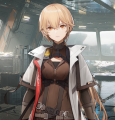 Example of story portrait screenshot.
 -
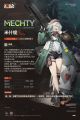 Example of promo image.
 -
 Example of promo artwork.
 -
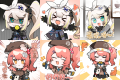 Example of official emotes (assembled for easier display).


Audio files
Used in the Quotes subpage. Should be in the OGG format. Only files that contain speech should be uploaded. After setting up the quotes page, use the red links to upload the sound files with the correct name.
Fore more details, see Template:GFL2QuotesSub.
What about 3D?
A Wiki plug-in to display 3D models is technically feasible but requires the contribution of someone with the required technical skills.